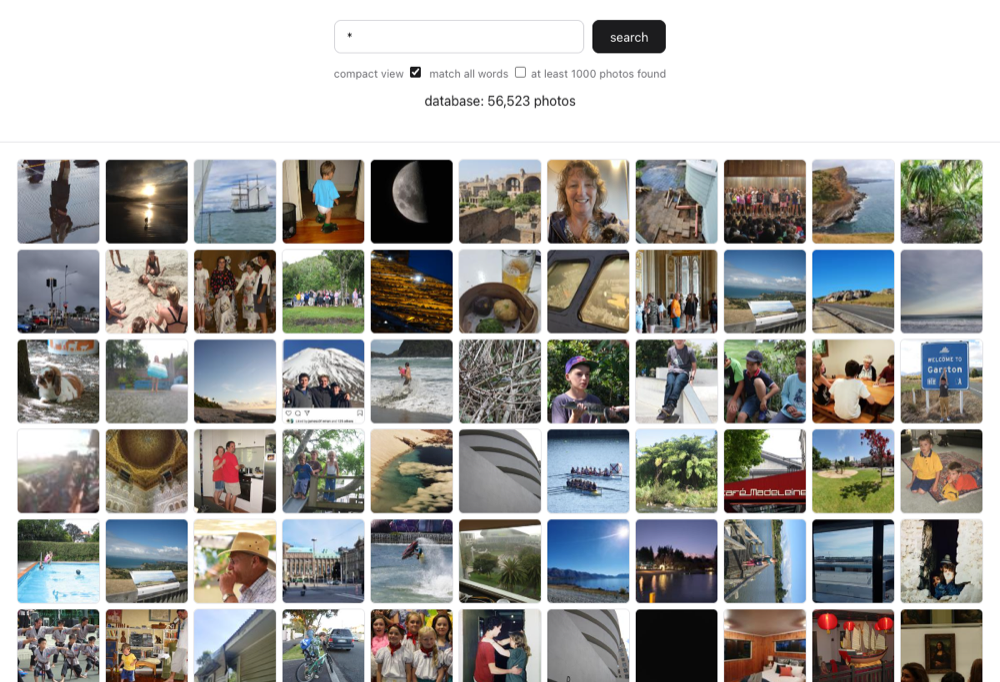
I have decades of photos, all sitting on Google Drive, and no good way to find anything in them. “That photo of the kids on the beach in maybe 2011?” was a folder-by-folder scroll through the year, hoping I’d recognise the thumbnail. I wanted a quick way to view and search my own photo library - by what’s actually in the photo, not just the filename or the folder it happened to land in.
I’d had a go at this before (hypersuper, still around for reference) and it had got messy - ad hoc scripts, no clear idea of what was safe to re-run, a schema that had grown sideways. hypersuper2 is the clean rebuild: a DuckDB database that tracks metadata about every photo - dimensions, a hash, GPS-derived location, an AI-generated description - kept in sync with the master copy by a set of small, idempotent pipeline steps, sitting behind a search API with a web app and a native Android app on top.
Vibe-coding it
I built essentially none of this by hand. I described what I wanted, Claude wrote the code, and my job was to use the result, notice what was annoying or missing, and describe the next thing. That’s the actual appeal of vibe-coding for a project like this: it moves the effort from “how do I write a reverse-geocoding rate limiter” to “what do I actually want this app to do for me” - which is a much more interesting question.
I didn’t design the dry-run/write-for-real split on the pipeline steps - I just got nervous about a step that deletes database rows for photos I’ve moved, said so, and “defaults to dry-run unless you pass --delete” became the rule for anything destructive or slow to undo. The Android app’s photo detail view grew a pinch-to-zoom and a download button because I was using it on my phone and kept wanting those, not because I planned them. Wanting the feature came first; how it got built was someone else’s problem.
It also means the project comes with unusually good documentation for something this size - a README.md, a claude/notes.md working file, per-app READMEs - because that’s how each session picks up where the last one left off. Which is handy, because it’s also most of what this post is built from.
How it fits together
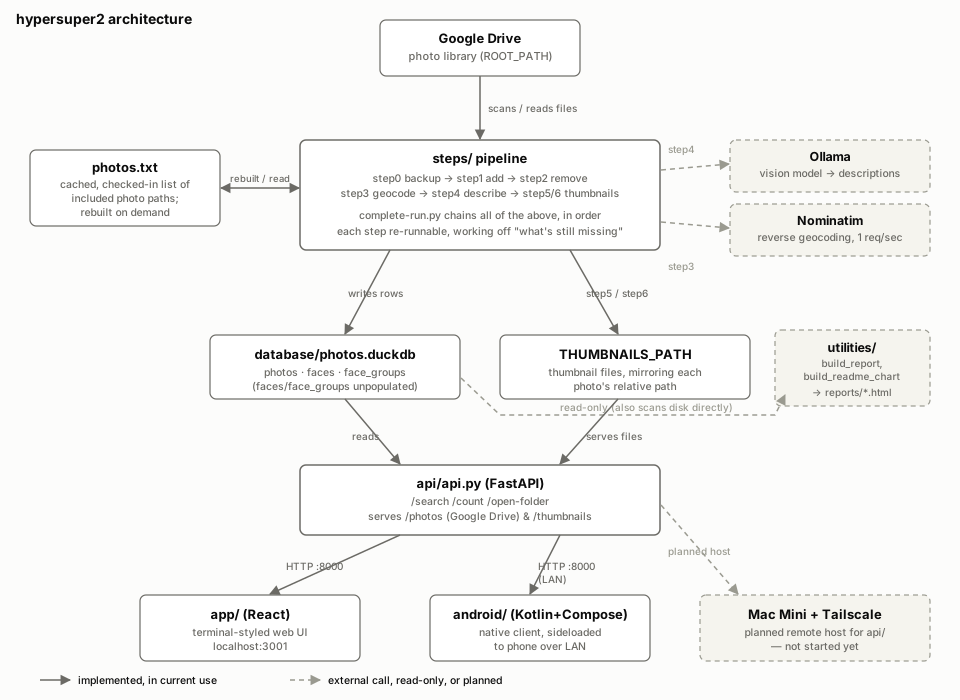
Google Drive (mounted locally) is the source of truth for the actual photo files. A numbered pipeline in steps/ reads from it and keeps two things in sync: the DuckDB database, and a folder of thumbnails. Each step does one job and is safe to re-run, because it always works off “what’s still missing” rather than assuming a particular starting state:
- step0 backs up the database first, because step2 and step6 delete things.
- step1 finds new files and adds a row each - size, dimensions, an MD5 hash, EXIF GPS if present.
- step2 finds rows for files that are no longer there (moved, deleted, or now excluded) and removes them. Dry-run by default.
- step3 reverse-geocodes any lat/lon into a place name via Nominatim, rate-limited to one request a second.
- step4 sends a thumbnailed copy of anything without a description to a vision model running on Ollama, and stores back a sentence or two describing what’s in it. Currently using
qwen3.5:9band getting descriptions in 20-30 seconds on a 16GB Mac Mini m4. - step5/step6 generate thumbnails for new photos and clean up thumbnails whose photo has since gone. Thumbnails live entirely outside the database, as files mirroring the photo paths.
steps/complete-run.py chains all of that into one real (non-dry-run) run. Step4 is the slow one - tens of seconds per photo through the vision model, and there can be thousands outstanding - so it commits after every single photo, specifically so it can be killed mid-run without losing progress.
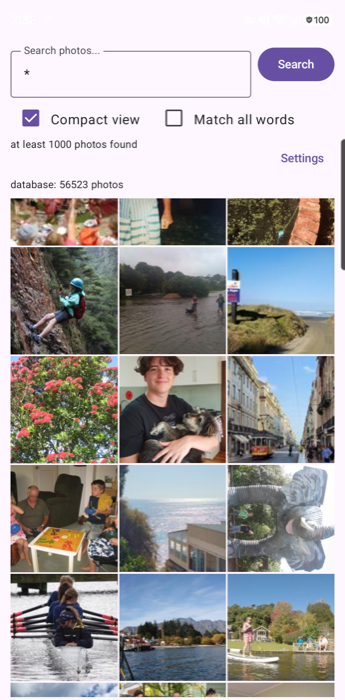
On top of the database sits a FastAPI service (api/) with /search, /count, and /open-folder endpoints, serving both the original photos and the thumbnails. Two independent clients sit on that same API: a React web app for use on my Mac, and a native Kotlin/Compose Android app sideloaded onto my phone for the same search on the go.
The whole thing runs on my Mac Mini reachable over Tailscale - so it’s not tied to my laptop being on.
What’s still missing
The faces/face_groups tables exist in the schema, but nothing populates them yet - face detection and clustering from the old project hasn’t been ported over, and I haven’t decided if I still want it. There’s also a growing gap between the two clients: the Android detail view has picked up zoom, a download button, and formatted metadata that the React app hasn’t caught up on, purely because I was the one testing on my phone when those ideas came up. Neither of these is a surprise, exactly - they’re just the natural shape of building something by pointing at the running app and saying “that, but better,” rather than planning it all up front.
AI
App pretty much completely vibe-coded - based on a very primitive app and the database schema. I also got Claude to maintain my documentation - a killer feature - and used that to get Claude to write this blog post. I have reviewed it, made a couple of changes … but the style is very obviously AI. I don’t dislike it - at some point I need to train it up on what I normally sound like.
Done
56,523 photos in there so far, 165.9GB worth. Finding “that beach photo from 2011” is now an actual search box instead of a memory test.